
An SEO audit checks whether Google and AI search tools can find, read and choose your pages, and it ends with a prioritised plan of fixes. A complete audit now covers nine areas, from indexing and speed to content, links and AI search readiness. This guide walks through each area, the steps and tools to run your own audit, and what a specialist audit should deliver. You can also download the checklist we use and work through it with your team.
What is an SEO audit?
An SEO audit is a structured review of how well a website can be crawled, indexed, understood and chosen by search engines and AI search tools. It looks at the technical set-up, the pages, the content, the links pointing to the site and how the business appears across the web. A useful website audit ends with a prioritised action plan, not just a score. Each item says what is wrong, why it matters, who should fix it and how much effort it takes.
Types of SEO audit
Most audits fall into one of seven types, and the right one depends on the problem you need to solve.
Full SEO audit
Covers every area below and suits a site that has not been audited yet or has stalled.
Technical SEO audit
Checks crawling, indexing, speed, structured data and rendering, often before or after a rebuild.
Content audit
Reviews every page against search intent and decides what to keep, merge, update or remove.
Backlink audit
Reviews the sites linking to you, broken links and risky link patterns.
Local SEO audit
Checks Google Business Profile, reviews and local listings for businesses that serve an area.
AI search readiness audit
Checks how AI Overviews, ChatGPT and Perplexity can reach and describe the business.
Migration audit
Records rankings, traffic and URLs before a redesign or platform move, then checks redirects after launch.
When to run an SEO audit
Run an audit when something changes in your traffic or your website, and on a regular cycle.
- Traffic or lead drop: Organic visits or enquiries fall and nobody can explain why.
- Before a migration and after it: A redesign, new CMS or domain change can lose rankings if redirects and templates are wrong. Start the baseline several weeks before launch.
- After a launch: Settings copied from a staging site, such as noindex, often break in the first weeks.
- Before starting SEO work: A new agency or hire needs a baseline to measure against.
- On a cycle: A light check each month in Search Console and a full audit once or twice a year suits most small and mid-sized sites.
If the site is also slow, broken or outdated, the audit is often the first step of a wider fix. A website rescue covers security, technical health, performance and SEO in one piece of work.
What a complete SEO audit covers
A complete audit looks at nine areas, and each one can stop good pages from earning traffic.
| Area | What it checks | Example issue |
|---|---|---|
| Goals and data | Business goal, key pages, Search Console and GA4 set-up | Form submissions are not tracked, so leads cannot be tied to pages |
| Crawl and indexing | robots.txt, XML sitemap, noindex, Page indexing report | Service pages excluded by a noindex tag left from staging |
| Technical health | Redirects, canonicals, status codes, HTTPS, structured data | Old URLs return 404 after a redesign instead of redirecting |
| Speed and mobile | Core Web Vitals, server response, images, mobile layout | Hero image loads late on mobile and the page shifts |
| On-page | Titles, meta descriptions, headings, URLs, internal links | Ten pages share the same title tag |
| Content and intent | Match with search intent, cannibalisation, thin or outdated pages | Two blog posts compete for the same query |
| Links and authority, mentions and local | Backlinks, broken backlinks, brand mentions, Google Business Profile | Links from other sites point to deleted pages |
| AI search readiness, local and entity data | Crawler access, Organization data, answer-first content, AI mentions | AI tools describe the business with an old service list |
| Report and follow-up | Priorities, owners, re-check date | Fixes are listed but nobody owns them |
Some audits now score signals that Google does not use. Google's guide to generative AI features in Search says Google Search does not use llms.txt and needs no special markup for AI features. Treat those checks as optional rather than urgent.
How to do an SEO audit
Work from what blocks Google to what improves results, so the first fixes have the most effect.
1. Goals and access
Business goal, key pages, Search Console and GA4.
4. Technical health
Redirects, canonicals, HTTPS and structured data.
5. Speed and mobile
Core Web Vitals and the mobile layout.
6. On-page
Titles, H1s, URLs and internal links.
7. Content and intent
Search intent, cannibalisation and thin pages.
8. Links and mentions
Backlinks, brand mentions and local profiles.
9. AI visibility
Crawler access and how AI tools describe you.
Stage 1: Set goals and get access
Decide what the audit is for before opening any tool. A drop in leads, a planned redesign and a new market each lead to different checks.
- Write down the business goal and the pages that serve it.
- List the main page templates: home, service, product, article, location and contact.
- Get access to Google Search Console, Google Analytics 4 and the CMS.
- Check: Export clicks, impressions and key events for the last three months as a baseline.
Stage 2: Crawl the site
A crawler visits every page the way a search engine does and lists status codes, titles, redirects and duplicates. Crawl the live site and the XML sitemap so you can compare the two.
- Check: Note the total pages, pages returning 3xx and 4xx, and pages found only in the sitemap.
Stage 3: Check indexing
Confirm that Google can reach and store the pages that matter. The Page indexing report in Search Console lists every reason a page is not indexed.
- Run the URL Inspection tool on your five most important pages.
- Check robots.txt and noindex tags for rules that block key pages.
- Check: Every page you want found is "on Google", and every excluded page is excluded on purpose.
Stage 4: Check technical health
This is the technical SEO audit part of the work. Keep it focused on the issues that affect many pages.
- Replace redirect chains with one 301 to the final URL.
- Fix internal links that point to 404 pages.
- Confirm each page has a canonical tag pointing to its own clean URL.
- Test structured data on the home page and one page per template.
- Check: One version of the site exists, with http, https, www and non-www all redirecting once.
Stage 5: Check speed and mobile
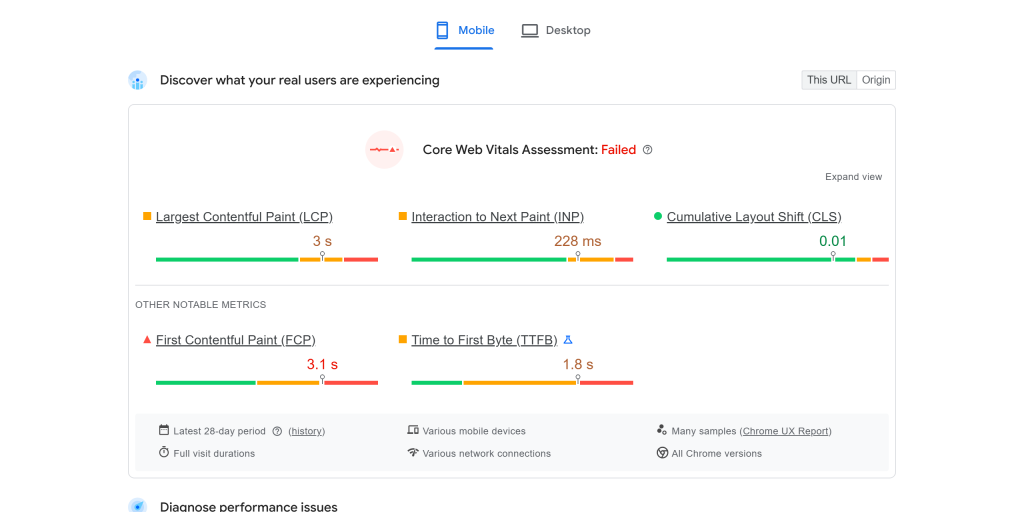
Test your main templates on mobile, not every page. Google's Core Web Vitals guidance sets three targets. Largest Contentful Paint (LCP) should happen within 2.5 seconds, Interaction to Next Paint (INP) should stay under 200 milliseconds, and Cumulative Layout Shift (CLS) should stay under 0.1.
- Read field data from real visitors first, then lab data to find causes.
- Check: Menus, forms and buttons work on a phone, and the mobile layout shows the same content as desktop.
Stage 6: Review on-page elements
Check that each important page tells search engines and readers what it is about.
- One clear H1 that matches the topic.
- A unique title tag and meta description.
- Internal links from related pages with descriptive anchor text.
- Check: Filter the crawl for duplicate or missing titles and H1s.
Stage 7: Review content against search intent
Compare each key page with what people actually search for. In Search Console, sort pages by impressions and look at the click-through rate.
- Search your main queries and note the type of page Google shows: guide, service page or comparison.
- Look for keyword cannibalisation, where two pages compete for the same search.
- Update, merge or remove thin and outdated pages.
- Check: Each search intent has one clear page on your site.
Stage 8: Review links, mentions and local presence
Look outside your site. Links and mentions from other sites show search engines and AI tools that the business is real and trusted.
- Review referring domains and redirect broken backlinks to the closest live page.
- Check that the business name, description and contact details match across directories.
- For local businesses, complete Google Business Profile and respond to reviews.
Stage 9: Check AI search visibility
AI search tools draw on the same signals, but it pays to see what they say about you. Build a fixed list of ten to twenty questions customers ask, such as "who builds hotel websites in Da Nang", and run them each month.
- Test the questions in Google, ChatGPT and Perplexity and log whether the business appears and how it is described.
- Check that robots.txt does not block search crawlers you want, such as OAI-SearchBot for ChatGPT search.
- Check: Organization schema on the home page lists the official profiles in sameAs.
SEO audit tools
Free Google tools and one crawler cover most of an audit for a small or mid-sized site. Prices below come from each official pricing page, checked on 18 November 2026, and may change.
Google Search Console
Search Console is free and shows which pages are indexed, why others are excluded, the queries that bring impressions and clicks, Core Web Vitals and security issues. The URL Inspection tool tests one page live. It is the starting point for every audit.
Google Analytics 4
GA4 is free and shows organic sessions and key events by landing page. It answers the business question an SEO tool cannot: which pages bring enquiries or sales.
PageSpeed Insights
PageSpeed Insights is free and tests one URL at a time. It shows Core Web Vitals from real Chrome users when available, plus a lab report with causes and suggested fixes.
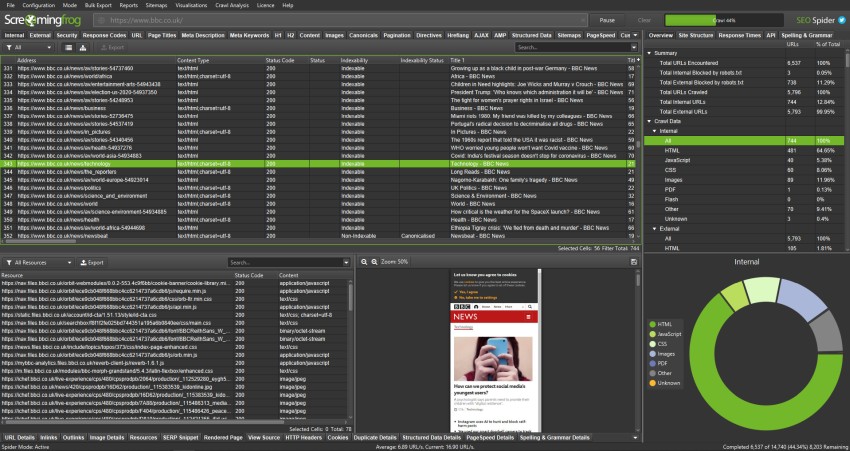
Screaming Frog SEO Spider
Screaming Frog crawls a site the way a search engine does and reports status codes, redirects, canonicals, titles, directives and duplicates. The free version crawls up to 500 URLs. According to the Screaming Frog pricing page, a paid licence costs £199 per year and removes the limit.
Semrush and Ahrefs
Paid suites add keyword rankings, competitor data, backlink data and site audit reports. The Semrush pricing page lists its SEO plan at US$139 per month on monthly billing.
The Ahrefs pricing page lists Lite at US$129 per month, and Ahrefs also offers a free plan for data on your own site. Both help, but you can run a solid first audit without them.
A free tool score is a useful first signal, not a plan. Tools weigh every warning the same way and do not know which pages earn your enquiries. Use the score to spot obvious errors, then let the business goal decide the order of work. The prices checked date for this section is 18 November 2026.
How to prioritise what you find
A crawl can return hundreds of warnings, and not every warning is a problem. Rate each issue by severity, impact and effort, then fix in this order, with indexing blockers first.
| Order | Issue type | Why it comes here |
|---|---|---|
| 1 | Key pages blocked or not indexed | They cannot appear in search at all |
| 2 | Errors on pages that already get impressions | These pages are close to earning clicks |
| 3 | Problems in a site-wide template | One fix improves many pages |
| 4 | Content mismatched with intent or cannibalised | Pages rank poorly or for the wrong searches |
| 5 | Minor warnings on low-value pages | Little effect on traffic or leads |
A missing meta description on a thank-you page matters far less than a noindex tag on a service page. Judge each warning by the page it affects and the business goal from Stage 1.
What a good SEO audit report includes
A good SEO report is short enough for the team to act on and specific enough for a developer to fix. Use this list to compare audits from different providers.
Worked example
Here is a hypothetical example to show how findings turn into a plan.
The example site is a small service business with 60 pages that has seen enquiries fall after a redesign. The table lists the findings by area and the order of fixes.
| Area | Finding | Priority |
|---|---|---|
| Crawl and indexing | Two service pages carry a noindex tag from the staging site | Fix first |
| Technical health | 40 old URLs return 404 instead of redirecting | Fix first |
| Speed and mobile | The new hero image makes LCP fail on mobile | Fix next |
| Content and intent | A blog post and a service page compete for the main service query | Fix next |
| On-page | Several location pages share one title tag | Fix this month |
| AI search readiness | AI tools still describe last year's service list | Fix this month |
The noindex tags and missing redirects come first because they block pages that used to earn enquiries. The template fixes come next because one change improves many pages. The content and AI fixes follow once the site can be crawled and indexed again. In a real audit, each row would also carry the pages affected, the evidence and the person who owns the fix, and the team would re-run the same checks four to six weeks after the changes go live.
Do it yourself or get a specialist audit
Site size, platform access and the cause of the problem decide whether you can audit in-house or need a specialist.
01
Do it yourself
For: Small sites and regular check-ups.
Free
You run the nine stages with free tools
You decide what to fix and when
02
Free audit
For: Knowing where to start.
Free
A review of one focus area
Top priorities in plain English, with a reply within 1 business day
03
Full service
For: Larger sites, migrations and unexplained drops.
Priced on scope
Every area and page template reviewed
Fixes carried out and checked
Small sites with clear access can usually be audited in-house. Large sites, migrations and unexplained drops usually need a specialist, because the cause often sits across several areas at once.
An audit and an SEO strategy are different pieces of work. The audit finds what is broken or missing today. The strategy decides which topics, pages and channels to invest in next, and uses the audit as its starting point.
Before you pay for an audit, ask what areas it covers, how issues are prioritised, what evidence comes with each one, who makes the fixes and whether a re-check is included. Enosta Digital Studio's marketing and creative services include Search Growth for Google and AI search, if you want one team for the audit and the fixes.
Download the SEO audit checklist
Our SEO audit checklist turns the nine areas into 47 checks you can work through with your team.

Get the SEO audit checklist
Enter your details and we will send the Excel checklist to your inbox.
Frequently asked questions
How much does an SEO audit cost?
It depends on the number of pages and templates, the platform, past migrations and how deep the content and competitor review goes. Free tool scans cost nothing, a focused review costs less than a full audit, and large or complex sites cost the most. Ask each provider for a written scope so you can compare like with like.
How long does an SEO audit take?
A small site can be checked in a few days. Larger sites, migrations and full content reviews take longer, because each page template and content group needs its own checks.
Do I need an SEO audit if my site is new?
Yes, a short one. A new site benefits most from a launch check of indexing, redirects from any old site, tracking and speed, before small problems spread across many pages.
What is the difference between a technical SEO audit and a full SEO audit?
A technical SEO audit covers crawling, indexing, errors, speed and structured data. A full SEO audit adds on-page elements, content against intent, links, local presence and AI search visibility.
Is a free SEO audit worth it?
A free tool scan is useful for spotting obvious errors, but it cannot set priorities for your business. A free review by a person adds that judgement for one focus area and shows whether a full audit is worth paying for.